
Overview
Short storage benchmarks are useful for comparing drives, but they can miss the exact failure mode that matters during long video recording. Many flash-based drives can write very quickly while an internal cache is available and then become much slower after tens, hundreds or even thousands of gigabytes. A camera does not care that the first part of a benchmark was fast. If write speed drops below the required recording data rate later in the session, recording can stop or frames can be lost.
CasinoLove Storage Tester is built around this problem. Instead of running a short synthetic burst, it creates one large normal file on the selected volume and writes continuously for the amount of data or time you choose. The live terminal interface shows how the speed changes during the run, while a CSV log keeps the samples for later inspection.
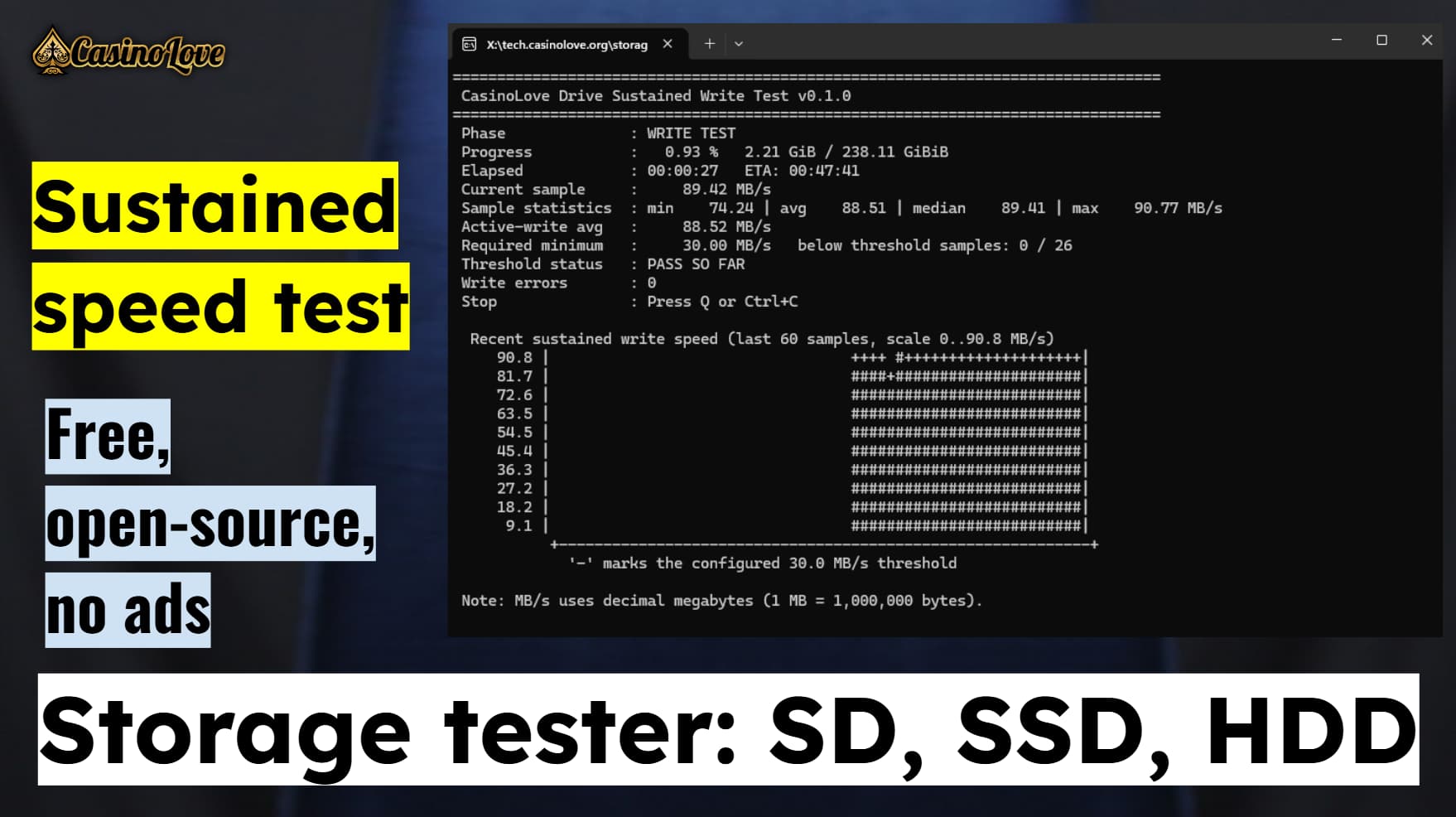
If a drive starts at 900 MB/s and later falls to 70 MB/s, the lower sustained region is often more important than the headline speed when choosing media for a camera or continuous capture device.
Why sustained write speed matters
SSDs, SD cards and other flash storage commonly use caching, parallel flash access and firmware optimizations to make short writes fast. This is useful in normal computer workloads, but long continuous recording can expose the slower underlying write behavior once a cache is exhausted.
The same can happen because of thermal throttling, a slow USB bridge, a hub, an enclosure, background activity, drive firmware behavior or the characteristics of the flash itself. For that reason, a five-second benchmark and a one-hour recording test answer different questions.
MB/s and Mb/s are not the same
The application reports decimal MB/s, meaning megabytes per second. Camera specifications often use Mb/s, meaning megabits per second. Eight bits equal one byte, so divide a bitrate in Mb/s by 8 to get its theoretical MB/s data rate before allowing for container, filesystem and workload overhead.
| Bitrate | Equivalent raw data rate |
|---|---|
| 200 Mb/s | 25 MB/s |
| 400 Mb/s | 50 MB/s |
| 800 Mb/s | 100 MB/s |
| 1,200 Mb/s | 150 MB/s |
The conversion above is mathematical only. Real recording systems can have bursts and other overhead, so a drive should not be selected solely from an exactly equal theoretical number.
Who this tool is for
Good fit
- videographers checking whether an SSD can sustain a camera's recording workload
- camera operators validating SD, SDXC, microSD or externally connected recording media
- Blackmagic, RAW, ProRes, high-bitrate and long-form recording workflows where sustained storage performance matters
- users investigating a drive that starts fast and becomes much slower after a large amount of data
- people checking a newly purchased drive before trusting it with important footage
- technical users testing USB enclosures, adapters, card readers and storage paths
- developers who want a small, inspectable Win32 storage test written in C
Not the main target
- random IOPS benchmarking
- 4K random read/write latency comparisons
- SMART diagnostics or SSD health monitoring
- TRIM, secure erase or drive firmware management
- raw-sector destructive testing
- filesystem repair
- recovering files from a damaged drive
Quick start
- Download storage-tester.exe.
- Connect the SD card, SSD, HDD or USB drive you want to test and make sure Windows can access it normally.
- Open Windows Terminal, PowerShell or Command Prompt and run the executable.
- Enter the target directory, for example
E:\. - Choose the test filename or keep the default.
- Enter how many GiB to write. Enter
0to use almost all safe free space. - Optionally set a time limit.
- Enter the minimum sustained speed you require in MB/s.
- Choose whether to perform full read-back verification after writing.
- Choose where to save the CSV log. A different physical drive is preferred for the cleanest measurement.
- Choose whether the large test file should be deleted automatically at the end.
- Review the summary and confirm START TEST.
Make sure the selected volume has enough disposable free space. The program does not erase unrelated files, but the test file can occupy most of the available space until it is deleted.
Test settings explained
| Setting | What it does | Practical note |
|---|---|---|
| Target directory | Selects the volume and folder where the large test file is created. | A drive root such as E:\ is the simplest choice. |
| Test filename | Names the generated file. | The default is casinolove-drive-test.bin. Existing files with the same name require confirmation before overwrite. |
| Test size in GiB | Controls how much data is written. | 0 uses the maximum safe free space while leaving a 256 MiB reserve. |
| Duration limit | Stops the write phase after the selected number of minutes. | 0 disables the time limit. The file can still be verified after a timed stop. |
| Required minimum MB/s | Defines the pass/fail threshold for write samples. | 0 disables threshold checking. |
| Read-back verification | Reads the written file and compares it with the exact pattern that should be stored. | Recommended when data integrity matters, not only speed. |
| CSV log path | Stores sample history, metadata, events and the final summary. | The app warns if the log is on the same tested volume because the extra writes can slightly influence the result. |
| Delete test file | Deletes the large test file after all requested phases finish. | If deletion is disabled, the file remains available for manual inspection or later removal. |
Filesystem choice
The application works through the normal Windows filesystem. exFAT and NTFS are practical choices for large test files. FAT32 has a maximum single-file size below 4 GiB, so a large sustained test cannot be represented as one file on FAT32. If you need to test a FAT32 volume with this version, keep the requested file below that filesystem limit.
Live screen and ASCII graph
The terminal display is designed to make a long test readable without a separate GUI. During writing it continuously shows the current state and recent speed history.
Stopping the test
Press Q or Ctrl+C to request a graceful stop. The application closes the active file and keeps the results collected so far. If verification is enabled and the write phase stopped cleanly, the portion already written can still be verified.
Understanding the statistics
How often is speed sampled?
The application aims for approximately one visible sample per second. Each sample can contain multiple 8 MiB writes.
The sampling window is based on wall-clock time, but the reported write speed uses the accumulated time spent inside WriteFile() for those writes.
Test-pattern generation and terminal drawing are deliberately excluded from the device-speed denominator.
Why the wall time and active write time can differ
Wall time includes the entire test process. Active write time includes only timed write calls. Pattern creation, user-interface work and other program overhead happen outside that active-write timer. This makes the main speed figure more representative of storage write behavior while still keeping total elapsed time visible.
MB/s, GiB and TiB
Speed is reported in decimal MB/s where 1 MB equals 1,000,000 bytes. File sizes in the terminal use binary units such as GiB and TiB where 1 GiB equals 1,073,741,824 bytes.
Minimum-speed threshold and pass/fail result
Before the test starts, you can enter a required minimum sustained speed. Every write sample is compared with that value. If even one measured sample falls below the threshold, the threshold result becomes a failure for that run.
This is intentionally stricter than comparing only the final average. A drive can have a high average and still be unsuitable for continuous recording if it periodically falls far below the required data rate.
| Example | Result | Meaning |
|---|---|---|
| Required 100 MB/s, minimum sample 126 MB/s | PASS | No recorded write sample fell below the configured target. |
| Required 100 MB/s, average 480 MB/s, minimum sample 72 MB/s | FAIL | The average is high, but at least one interval was too slow. |
| Required speed 0 MB/s | Not evaluated | The tool still measures speed, but threshold pass/fail checking is disabled. |
Full data verification after writing
A successful write call proves that Windows accepted the operation, but it does not by itself prove that every byte can later be read back exactly as intended. The optional verification phase therefore reopens the test file, reads it sequentially and checks the content against the expected deterministic test pattern.
What the pattern can detect
- changed or corrupted data
- a block containing unexpected content
- data written at the wrong logical position
- short reads and operating-system read errors
- some fake-capacity or wraparound behaviors when later writes overwrite earlier logical data
Why the pattern depends on file position
Every 64-bit word is generated from a fixed seed combined with its absolute word position in the file. That means copying a valid block to the wrong place does not pass verification, because the expected data is different at every position.
The tool does not read while the write test is active because that would change the continuous sequential write workload. Verification happens after writing, so write-speed measurement and integrity checking remain separate.
The final Mismatch blocks value counts blocks in which the verifier found unexpected data. It is not a count of every individual corrupted byte.
CSV log and long-term analysis
The live terminal is useful while testing, but a storage problem is often easier to understand afterward. The application therefore writes a CSV-style log containing configuration metadata, each speed sample, error events and the final summary.
Metadata stored at the beginning
- application version and local start time
- target path and volume root
- filesystem name
- logical and physical sector sizes
- I/O alignment
- test file size
- write block size
- minimum required MB/s
- I/O mode
Per-sample columns
phase,sample,elapsed_s,total_bytes,sample_bytes,sample_duration_s,
speed_mbps,average_mbps,min_mbps,median_mbps,max_mbps,
threshold_mbps,threshold_pass,error_count
Error and event lines
Important events are written as comment-style lines beginning with #. This includes write failures, short writes, read failures, data mismatches, flush failures and the duration limit being reached.
Where relevant, the log also records the file offset associated with the event.
Why the log should preferably be on another drive
Writing the CSV to the same volume being tested adds a second stream of small writes. The program detects that situation and warns before starting. Keeping the log on the system drive while testing removable media gives a cleaner single-workload measurement.
Safety and practical testing notes
The test does not format the drive
Storage Tester uses a normal file in the directory you select. It does not open the physical disk for raw destructive access, does not repartition the device and does not intentionally overwrite unrelated files. If the chosen test filename already exists, the application asks before replacing it.
It can still fill most free space
A maximum-size test uses the available free space minus a 256 MiB safety reserve. This protects against trying to consume the final bytes of the volume, but the drive can still become almost full during the test.
Flash wear is real
This is a genuine write test, not a simulated progress bar. Writing 1 TiB means approximately 1 TiB of host writes to the storage path. SSDs, SD cards and USB flash devices have finite write endurance, so repeated full-capacity tests should be used only when they provide useful information.
Thermal throttling is part of sustained behavior
An SSD can slow down because its controller or NAND becomes hot. For a long recording workload that is useful information, because a camera can encounter the same thermal limit. Enclosure material, airflow, ambient temperature and direct sun can therefore change the result.
Test the complete connection path you actually plan to use
USB cable quality, card readers, hubs, USB-to-NVMe/SATA bridges and ports can all limit or destabilize performance. Testing an SSD through one enclosure does not guarantee the same result through another enclosure or inside a different camera.
Avoid unrelated activity on the tested drive
File copies, antivirus scanning, indexing, backup software, synchronization tools or other applications using the same storage can reduce measured speed. For repeatable tests, keep unrelated activity low and record the test conditions with the CSV result.
Unexpected disconnects
If a USB drive is disconnected, a card reader loses connection or Windows reports an I/O error, the program checks the failed operation, records the error where possible and exits the active phase cleanly instead of intentionally continuing as though the data was written. Windows and hardware drivers can still take time to return an error after a physical disconnect.
The generated file contains deterministic synthetic test data. It exists only to create and verify the workload and can be deleted after the test.
Privacy, efficiency and the CasinoLove app philosophy
CasinoLove tools are intended to be useful without turning a simple utility into a service that needs accounts, advertising or user tracking. Storage Tester follows the same approach.
The app has no reason to contact a remote server while testing. The only files it creates are the test file and the CSV log locations selected by the user.
What the result means, and what it does not mean
Storage Tester is intentionally focused. It answers whether the selected Windows storage path can sustain a large sequential file write under this test and whether the generated data can be read back correctly. It is not a certification system for every camera, filesystem or storage device.
Important limitations
- The workload is one large sequential Windows file. A camera can use a different operating system, filesystem driver, queue depth, block size or write pattern.
FILE_FLAG_NO_BUFFERINGandFILE_FLAG_WRITE_THROUGHreduce the influence of the Windows file cache, but storage controllers, SSD firmware and hardware caches still exist.- The app does not measure random I/O performance or small-file behavior.
- The app does not inspect SMART attributes, NAND wear, controller temperature or firmware health.
- The app does not prove that a drive will never fail later. It reports what happened during the current test.
- Read-back verification can detect mismatched data in the test file, but it is not a complete forensic media diagnostic.
- A pass at one temperature, port, cable or enclosure does not guarantee the same result in another configuration.
- Very short tests can still miss cache exhaustion that would appear only after writing much more data.
Developer documentation and architecture
Technology scope
- C11 source code
- native Win32 file and console APIs
- Windows 10 and Windows 11 target
- MinGW-w64 / GCC build path
- no GUI framework
- no third-party runtime library
- no network or telemetry subsystem
- single source file:
storage-tester.c
High-level application flow
startup
  -> collect interactive test settings
  -> validate target directory and filename
  -> query free space, filesystem and sector information
  -> choose conservative I/O alignment
  -> create CSV log
  -> open test file with unbuffered + write-through flags
  -> allocate aligned 8 MiB buffer

write loop
  -> generate deterministic data for current file offset
  -> time WriteFile()
  -> accumulate bytes and active write time
  -> create approximately one speed sample per second
  -> update min / average / median / max statistics
  -> append CSV sample
  -> redraw terminal UI and rolling graph
  -> stop at target size, duration limit, Q/Ctrl+C or error
  -> FlushFileBuffers()
  -> close write handle

optional verification
  -> reopen file for unbuffered sequential reading
  -> read each block
  -> regenerate expected data from absolute file offset
  -> compare bytes
  -> log mismatches and read errors

finish
  -> append final CSV summary
  -> print final terminal result
  -> optionally delete the test file
Main constants in the current version
| Constant | Current value | Purpose |
|---|---|---|
DEFAULT_BLOCK_SIZE | 8 MiB | Large sequential application I/O block. |
SAFETY_RESERVE | 256 MiB | Free space intentionally left unused in maximum-size mode. |
SAMPLE_TARGET_SEC | 1 second | Target wall-clock interval between visible/logged speed samples. |
GRAPH_WIDTH | 60 samples | Rolling speed history shown in the terminal. |
GRAPH_HEIGHT | 10 rows | Vertical resolution of the ASCII speed graph. |
Windows APIs used for the storage path
The program uses the wide-character Win32 API variants for normal filesystem paths. The main write handle is opened by CreateFileW() with
FILE_FLAG_NO_BUFFERING and FILE_FLAG_WRITE_THROUGH. Data is written with WriteFile() and the file is explicitly flushed with FlushFileBuffers() before closing.
Why unbuffered and write-through I/O are requested
A benchmark can report misleadingly high short-term numbers if it mostly measures how fast data enters the Windows filesystem cache.
FILE_FLAG_NO_BUFFERING requests file I/O without the normal system data cache, while FILE_FLAG_WRITE_THROUGH asks Windows to send writes through the storage stack rather than treating ordinary lazy caching as completion.
These flags do not remove every cache inside a modern SSD or bridge. That is intentional: controller cache exhaustion and firmware-managed sustained behavior are part of the device path the application is trying to observe.
Sector size and alignment
Unbuffered Windows I/O has stricter buffer, length and offset alignment requirements. The code queries the normal bytes-per-sector value with GetDiskFreeSpaceW() and attempts to query the physical sector size through
IOCTL_STORAGE_QUERY_PROPERTY with StorageAccessAlignmentProperty.
The current implementation chooses the larger of the logical and physical sector values, uses at least 4096 bytes, and rounds that value up to a power of two for conservative alignment. Requested test sizes and transfer lengths are aligned down to this boundary.
Aligned buffer allocation
The 8 MiB I/O buffer is allocated with VirtualAlloc(). Windows virtual allocations are aligned sufficiently for the sector-aligned unbuffered I/O requirements used here.
Timing model
QueryPerformanceCounter() provides the high-resolution timer. The code keeps two concepts separate:
- wall elapsed time for overall progress, duration limits and ETA
- active write time measured around each
WriteFile()call for storage-speed calculation
The deterministic data buffer is filled before the write timer starts. This prevents CPU pattern generation from being counted as device write time.
Deterministic integrity pattern
The test pattern is generated by a compact 64-bit mixing function. Each output word depends on a fixed project seed and the word's absolute file position. During verification the same value is regenerated from the offset and compared with the stored data.
expected_word = mix64(PATTERN_SEED ^ absolute_word_index)This design avoids storing a second reference copy in memory or on disk. It also makes a block position-sensitive instead of repeating the same pattern everywhere.
Statistics storage and median calculation
Speed samples are kept in a dynamically growing double array. Minimum, maximum and sum are updated when a new sample is added.
The average is calculated from the stored sum. Median calculation copies the current sample array and sorts that copy with qsort().
Median calculation and terminal rendering happen outside the timed WriteFile() section, so they do not enter the active-write speed denominator.
On extremely long runs, repeatedly sorting a growing sample history can still add some CPU and wall-clock overhead even though it does not directly lower the reported active write speed.
Rolling terminal graph
The graph uses the most recent 60 samples. The vertical scale automatically follows recent speed and also reserves space for the configured threshold.
Full cells use #, partial cells use +, and the threshold line uses - where it crosses the graph.
CSV behavior
The CSV is opened before the storage test and is flushed after header data, samples and events with fflush().
The log is UTF-8 and path strings are converted from the application's wide-character Windows representation before being written.
Error handling model
Win32 return values are checked around file open, write, read, buffer allocation, flush and deletion operations. Where a Windows error code is available, it is stored in the test state and translated to readable console text through FormatMessageW().
A short write or short read is treated as a failure even if the underlying API call itself returned success. Important errors are also appended to the CSV with the associated file offset when available.
Graceful stop handling
Keyboard polling accepts Q, while a Windows console control handler converts Ctrl+C, Ctrl+Break and relevant console shutdown events into a stop request. The normal loop then exits through its cleanup path instead of using an intentional hard process termination.
Current process exit codes
| Exit code | Meaning |
|---|---|
0 | Requested write and verification work completed without recorded write/read/mismatch failure. |
1 | Configuration was cancelled or configuration failed before the test started. |
2 | The CSV log file could not be created. |
3 | The write or verification phase failed, or errors/data mismatches were recorded. |
Portability considerations for a future Linux version
The measurement model is intentionally separable from the Windows-specific API layer. A Linux port could keep the configuration model, deterministic pattern, statistics, CSV format and terminal concepts while replacing Win32 file opening, alignment queries, console control handling and timing wrappers with POSIX/Linux equivalents.
The main platform-specific areas are CreateFileW()/ReadFile()/WriteFile(), Windows unbuffered I/O flags, storage property queries, console cursor functions, VirtualAlloc(), and the control-handler implementation.
Building from source
The complete source is available directly from this page as storage-tester.c. There is no Git repository or package download required for the published version.
MinGW-w64 GCC
gcc -O2 -std=c11 -Wall -Wextra -Wpedantic storage-tester.c -o storage-tester.exeThe program uses Windows system APIs and the standard C library. No separate third-party library needs to be downloaded or linked for the current build.
Why keep it as one C file?
The project is small enough that a single source file keeps review, backup, compilation and open-source inspection simple. A user can download the source, read the complete implementation and compile it without a build system, package manager or generated project files.
Deployment files
The documentation, source, executable and thumbnail formats are designed to live together in one static directory:
/storage-tester/
  index.html
  storage-tester.c
  storage-tester.exe
  storage-tester.jpg
  storage-tester.webp
  storage-tester.avif
The download and source buttons use relative links, so the directory can be moved as a unit without changing the filenames.
The documentation page uses the shared CasinoLove Tech stylesheet at /article.css and the existing site logo at /casinolove-logo.webp with JPG fallback.
Technical references
User and technical FAQ
Will this erase my whole drive?
No. It creates one normal test file in the selected directory. It does not format or repartition the drive and does not intentionally overwrite unrelated files. The test file can, however, use most of the currently free space.
Can I use it on an SD card?
Yes. If Windows mounts the card as a writable filesystem and the selected file size is supported by that filesystem, the application can test it through the card reader.
Can I use it on an external SSD or HDD?
Yes. USB, SATA-backed and other Windows-mounted storage can be tested as normal files. The result includes the complete connection path, so the enclosure, bridge, cable and port can influence the measurement.
Does it work with exFAT?
Yes. exFAT is especially practical for large removable media because it supports files much larger than the FAT32 single-file limit.
Why not just use a normal SSD benchmark?
Normal benchmark tools can be excellent for general performance comparison, but many use shorter workloads. This utility is focused specifically on long sequential writes, minimum sustained speed and full-file verification.
Can this show when an SSD cache runs out?
Often, yes. If the drive writes quickly while its cache is available and then falls to a lower sustained rate, the rolling graph and CSV history should show the transition when the test is long enough to reach it.
Can it detect a fake-capacity drive?
The full read-back verification can expose many cases where later writes overwrite earlier logical data or where the stored content does not match the requested offsets. It is still not presented as a dedicated forensic fake-capacity certification tool.
Why does the program ask for a minimum speed?
For recording, the slowest sustained region can matter more than the average. A minimum threshold gives a simple pass/fail rule for the requirement you configure.
Why is the minimum based on samples instead of every individual WriteFile call?
Individual API calls can be very short and noisy. Grouping writes into roughly one-second reporting windows gives a more useful sustained-speed view while still being responsive enough to reveal significant drops.
Why is there a separate verification pass?
Reading while writing would change the workload. The separate pass keeps the write test sequential and then checks integrity afterward.
Does verification permanently write more data?
No. Verification reopens the existing test file for reading. It adds read traffic and test time, but it does not create another full-size verification file.
Can I stop the test early?
Yes. Press Q or Ctrl+C. You can also set a duration limit before the test begins.
Why does maximum-size mode leave 256 MiB free?
The reserve avoids deliberately consuming every last reported free byte on the volume and gives the filesystem a small amount of breathing room.
Should I place the CSV log on the tested drive?
It is possible, but not ideal. The application warns because logging adds a second write stream. A different drive gives a cleaner measurement of the target volume.
Does the app upload benchmark results?
No. The native application has no upload, analytics or telemetry feature. Results stay in the local terminal and the CSV file you choose.
Does the app require installation?
No installer is required. The published version is a small standalone executable. You can also compile the single C source file yourself.
Why is the application so small?
It is written directly in C against Win32 APIs and does not bundle a browser engine, GUI framework, package runtime, analytics SDK or third-party application framework.
Can I inspect the source without GitHub?
Yes. Download or open the C source directly here. The source and executable are hosted in the same project directory as this documentation.
Will there be a Linux version?
The current release targets Windows 10 and Windows 11. The core test model is suitable for a future Linux port, but the current source uses Windows-specific storage and console APIs.